Building & Benchmarking: LLMs on a 16GB Jetson Orin NX for Hermes Agent
Introduction
Small AI computers are usually sold with large dreams and shitty memory buses.
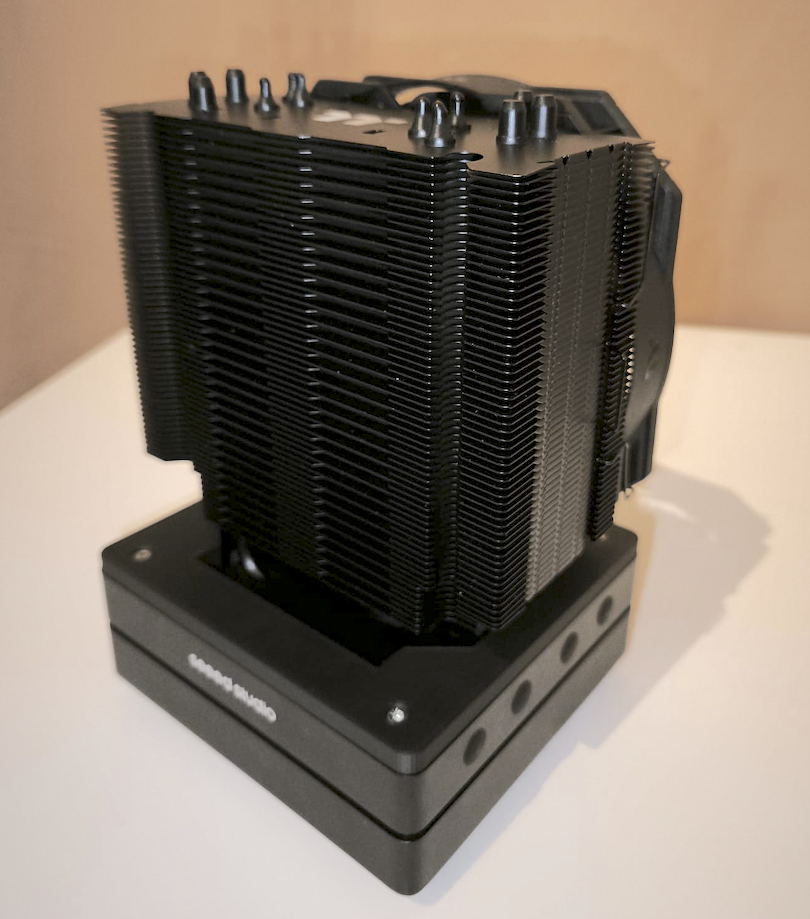
I have a ridiculous server that pulls a few kilowatts, but I wanted a local Hermes Agent box that could sit on a shelf, stay near silent, draw laptop-class power, and still run a serious model with enough context for real agent work: always available, and cheap enough that leaving it on doesn’t generate anxiety.
The 16GB Jetson Orin NX is an awkward but interesting fit for that job. I have a spare one from back-in-the-day for a robotics project now gathering dust. It has CUDA, a real NVIDIA GPU, unified memory, low power draw, and enough IO to be useful as an edge computer rather than a toy (SPI, GPIO etc). It also has just little enough RAM that it took about two days of grinding benchmarks to get the damn thing wrangled.
This post is a build and tuning guide for turning that board into a silent, low-energy Hermes Agent system. The hardware build gets the board into a sustainable 40W thermal envelope with super low fan noise (12 V fan at 5 V).
If you are trying to run Hermes Agent on a 16GB Jetson, the key lesson is simple:
The agent is not just the model. The context, KV cache, tool behaviour, prompt cache, CUDA workspace, and operating system all have to fit too. And which model? I tried ’em all for ya! Gemma-4-12B, Gemma-4-26B-A4B, Qwen3.6-35B and Qwen3.6-27B!
That changes the benchmark question a bit. I do not only care which GGUF gives the highest tokens per second, but rather which model and which configurations give the best balance of context depth, tool-calling reliability, and enough decode speed that the agent remains tolerable to use (Hermes Agent needs > 64K tokens).
The Build: Silent 40W Edge AI
I have a Seed Studio Jetson J4012 module. The thing runs at 25 watts… until Nvidia released a new patch unlocking MAXN SUPER mode at 40 W! Checking the Seeed Studio Wiki, I found this:
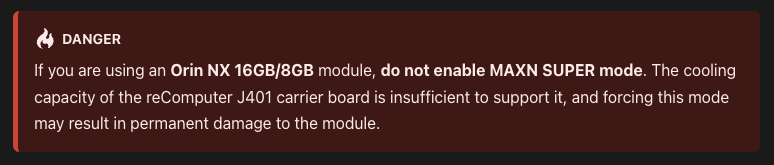
… OK, now I have to do it.
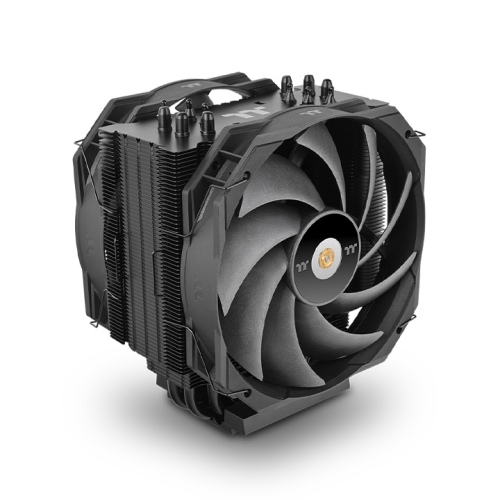
I found this CPU cooler on the ‘bay: ThermalTake WAir CPU Cooler, and decided it was the perfect fit for the teeny-tiny compute module in the Seeed Studio case.
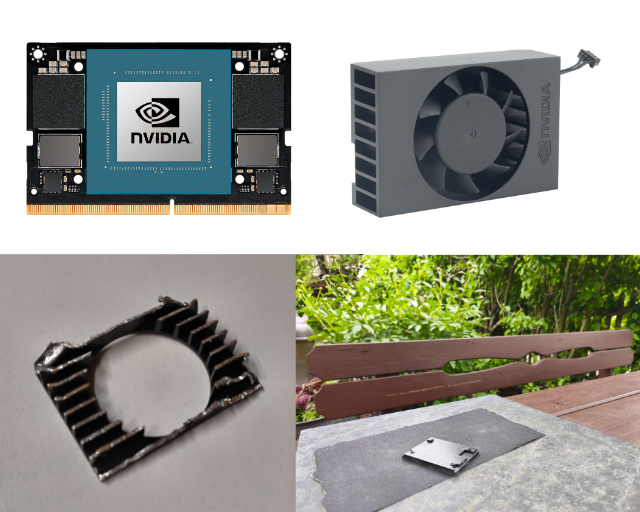 The Jetson compute module, the original small heat sink, what was left after the hacksaw, and the polished spacer material.
I hacked the heatsink in half, snipped off the remaining stumpy fins, and sanded the leftover chunk of aluminium down over a cold beer. I found a flat-enough marble tile, and went through a few grades of sand paper until I got bored.
The next bit was breaking out the calipers, measuring everything to death, and designing a new case that fit with the comically large cooler. This took too many iterations, but PLA filament is cheap. Remember the rule of design in the 3D printing era: Measure Twice, Print 5 Times
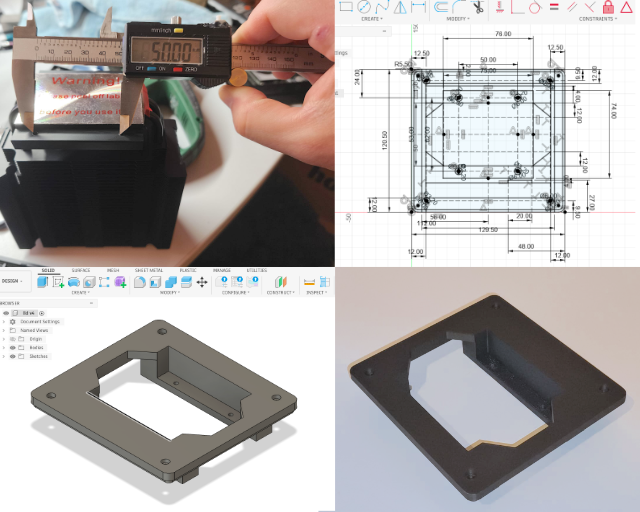 Measuring the cooler dimensions, designing the new case lid in Fusion 360, and the final 3D print from the Bambu Lab X1 Carbon.
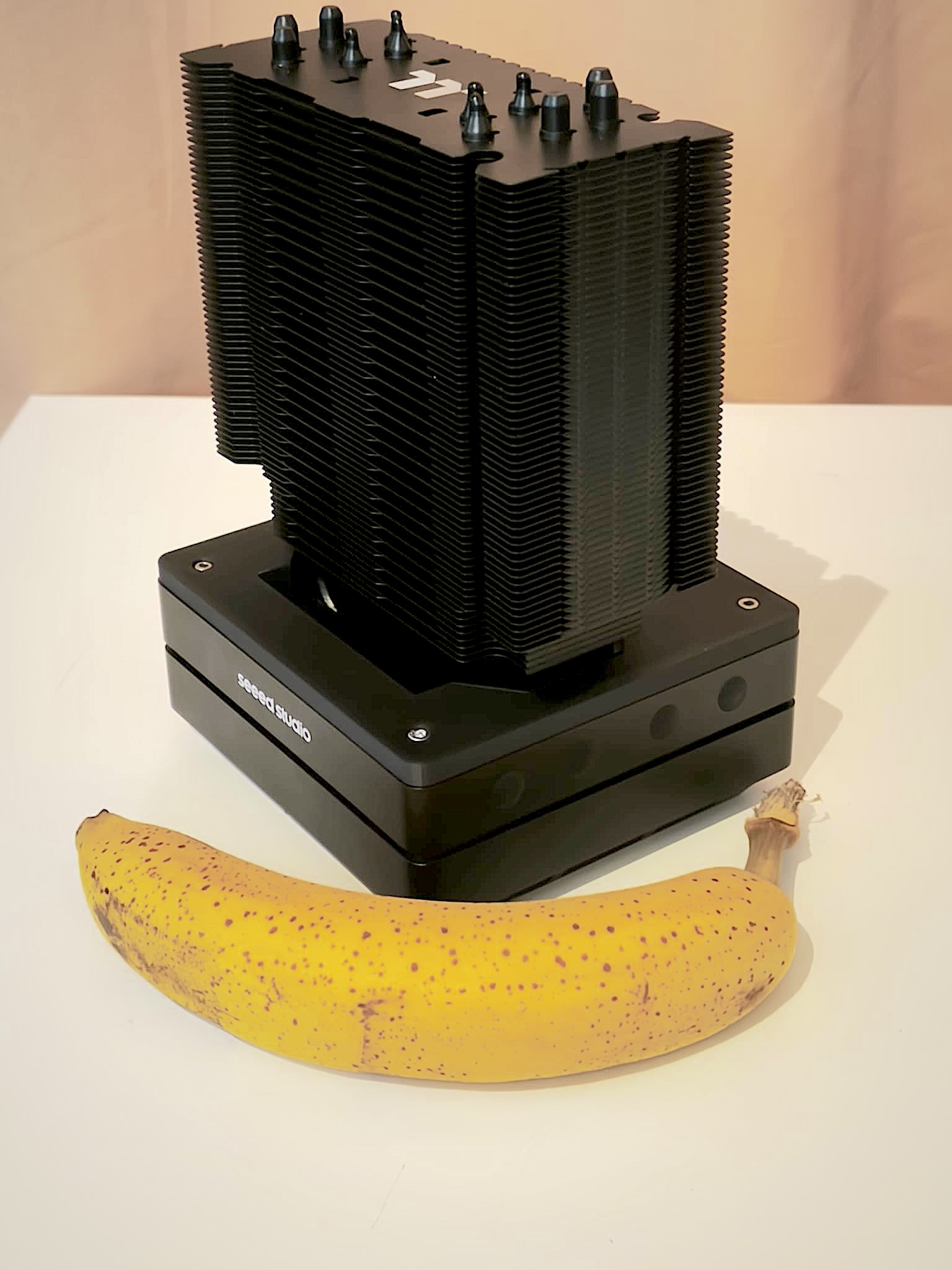
Pretty slick, right? It is a quiet thermal solution that lets the Jetson hold useful clocks during sustained llama.cpp generation. That matters more than peak benchmark numbers. A local agent box that is fast for thirty seconds and then thermally throttles is not a useful ‘always-on’ appliance.
Why the Jetson?
The honest answer is: if all you want is a quiet 16GB local LLM box for ordinary small and medium models, a Mac mini M4 may be the better choice. I built it because it was a) gathering dust, and b) more fun wasting time with this than dealing with ‘bay scammers if I tried selling it.
A Mac mini is silent, polished, fast, widely supported by llama.cpp’s Metal backend, and has higher unified-memory bandwidth than the Jetson Orin NX. For a normal person who wants a small desk appliance for local chat, coding help, or lightweight agents, the base Mac mini M4 is the obvious comparison.
But I do not want to over claim this. I have not run the same Hermes Agent benchmark suite on a 16GB M4 Mac mini. The hard part here is not “can it run llama.cpp?” It is whether the exact quantized model, long context, KV cache choice, tool-calling behaviour, and operating-system memory pressure still leave enough room for the agent to be useful. A 16GB Mac also has to share memory with the OS and GPU. The M4 may be the better general machine, but that does not automatically prove it runs this specific 26B/35B Hermes workload better.
The Jetson becomes interesting only when the requirements are narrower: CUDA, Linux edge deployment, camera and robotics IO, small embedded form factor, and the ability to run the same NVIDIA-oriented software stack used in other edge AI projects. I wanted a silent Hermes Agent appliance that was also still a Jetson.
So the comparison is not “Jetson beats Mac mini.” The comparison is:
Consider the Mac mini M4 if you want a polished quiet consumer LLM box. Build the Jetson if you specifically want a silent CUDA edge appliance, and benchmark carefully if your target is long-context Hermes Agent rather than casual chat.
With that caveat, here is the competitor field:
| Hardware | Why it is tempting | Why I did not build this around it |
|---|---|---|
| Mac mini M4 16GB | Silent, efficient, fast, strong llama.cpp Metal support, 120 GB/s unified-memory bandwidth. | Likely better for ordinary quiet local LLM use, but I have not verified this exact Hermes Agent workload, quantization, and long-context profile on 16GB macOS. |
| Mac mini M4 Pro | Much more memory bandwidth and configurable unified memory. | A stronger local AI desktop, but more expensive and still not CUDA or embedded edge hardware. |
| Jetson AGX Orin 64GB | Same ecosystem, far more memory, much easier long-context serving. | Much better if money is no object, but it moves the project out of the low-cost appliance category. |
| DGX Spark-class mini AI systems | 128GB coherent memory and a serious NVIDIA software path. | A different budget class entirely. Great workstation toy, not a cheap always-on shelf appliance. |
| Ryzen AI Max / Strix Halo mini PCs | Strong CPU/iGPU, large unified memory options. | Promising, but usually closer to workstation pricing and not the CUDA path I wanted here. |
| RK3588 / Orange Pi / Raspberry Pi class boards | Cheap and low power. | Fine for small models, but not close for 20B-35B llama.cpp serving with Hermes-style context and tool behavior. |
| Used RTX 3090 desktop | Excellent raw tokens per dollar. | Loud, hot, 250W-plus under load, and not the silent low-energy appliance I wanted. |
Official specs put the Jetson Orin NX 16GB at 16GB LPDDR5 with 102.4 GB/s memory bandwidth and 10W-25W module power modes, with higher-power carrier configurations available. Apple’s 16GB Mac mini M4 has 120 GB/s unified-memory bandwidth and a much more refined desktop experience. That makes the Mac mini the more sensible default recommendation for many quiet local LLM users, but not a proven drop-in replacement for this Hermes Agent profile. The Jetson’s argument is not that it is the better Mac mini. It is that it is a tiny CUDA edge computer that can be tuned far enough to run Hermes Agent usefully while staying silent. Sources: NVIDIA Jetson Orin NX specs, Seeed reComputer J4012, Apple Mac mini specs, NVIDIA DGX Spark.
The Constraint: 16GB Is Not 16GB
The Jetson reports roughly 15.6 GiB available to CUDA. That sounds close enough to 16GB until you try to load a 13GB GGUF and ask for a 4096 token context.
On a discrete GPU the usual mental model is:
- Put model weights in VRAM.
- Put the KV cache in VRAM.
- Hope nothing else needs much.
On Jetson, the memory is unified, which is both wonderful and dangerous. The CPU and GPU are drawing from the same pool, so “VRAM” pressure is really system pressure.
For local LLM serving, the relevant memory consumers are:
| Component | What it is | Why it matters |
|---|---|---|
| Model weights | Quantized GGUF tensors | Usually the largest fixed cost. |
| KV cache | Attention keys/values for the active context | Grows with context, slots, and KV precision. |
| Prompt cache | llama-server cache for prompt reuse | Useful, but not free. |
| CUDA graphs/workspace | Runtime execution overhead | Helps speed, costs memory. |
| Draft model/MTP | Extra speculative decoding model or head | Can be tiny, can be impossible, depends on architecture support. |
| OS and services | Everything else on the Jetson | Easy to forget until the model fails to load. |
That last row matters more than it should. A desktop with 64GB of RAM can be sloppy; I had to turn off desktop mode, and I run Hermes Agent on a separate server. Spoiler: this machine does a great job and a pure LLM inference, but uses up every spare megabyte of VRAM.
The Basic llama.cpp Build
I used a CUDA-enabled llama.cpp build with CUDA graphs and CUDA Flash Attention enabled. The relevant build characteristics were:
| Setting | Value |
|---|---|
| llama.cpp version | 9466 (bdab9e726) |
| CUDA architecture | sm_87 |
| CUDA graphs | enabled |
| CUDA Flash Attention | enabled |
| Flash Attention all quants | enabled |
| CPU threads used for generation | 4 |
| Server slots | 1 |
| Default context | 4096 |
The build command was the normal CMake flow, but configured for CUDA:
1
2
cmake -B build -DGGML_CUDA=ON -DGGML_CUDA_FA=ON -DGGML_CUDA_GRAPHS=ON -DCMAKE_BUILD_TYPE=Release
cmake --build build --config Release --target llama-server llama-bench -j 8
The important part is not the exact command. It is that the server binary you benchmark must match the shared libraries it loads. After pulling llama.cpp, rebuild the tools you use. Otherwise you can end up with an old llama-bench executable trying to load new shared libraries, which fails in boring but confusing ways.
Finding the best Flag Settings
Here is the short version.
| Flag | Setting | Reason |
|---|---|---|
-ngl | 99 or auto | Keep as much as possible on GPU. |
-fa | on | Flash Attention is required for good memory and speed behaviour. |
-c | 4096 | Good compromise between usefulness and KV cache size. |
-np | 1 | Multiple slots multiply memory pressure. |
-b | 1024 or 2048 | Higher can help prompt processing, but costs memory. |
-ub | 512 or 1024 | Physical batch size; tune down first when loading fails. |
-ctk/-ctv | q8_0 or f16 | Memory/speed tradeoff for KV cache. |
--cache-ram | 1024 | Useful prompt cache without letting it grow wild. |
--fit | on for marginal models | Lets llama.cpp reduce offload/context to fit. |
-fitt | 768 | Leaves a safety margin on the device. |
The surprising result on Gemma 4 was that f16/f16 KV was slightly faster than q8_0/q8_0 on this setup. That is the opposite of what you might choose if you only think about memory. But for a model that already fits, the extra precision can remove some overhead and help decode speed a little.
On the TurboQuant fork, the same 16K control run on Qwen3.6-27B-UD-IQ3_XXS.gguf showed that q8_0/turbo3 shaved a little RAM versus plain q8_0/q8_0 without changing throughput, and q8_0/q4_0 landed in the same range too:
| KV cache | Prompt processing | Token generation | Peak RAM |
|---|---|---|---|
q8_0/q8_0 | 102.93 tok/s | 4.067 tok/s | 14114 MB |
q8_0/turbo3 | 102.55 tok/s | 4.070 tok/s | 13891 MB |
q8_0/q4_0 | 103.15 tok/s | 4.071 tok/s | 13945 MB |
I repeated the same idea on the other two serious long-context candidates, using an 8K prompt and 256-token decode. The shape held: TurboQuant saved memory versus q8_0/q8_0, but it was very close to ordinary q8_0/q4_0 at this context length.
| Model | KV cache | Prompt processing | Token generation | Peak RAM |
|---|---|---|---|---|
| Gemma 4 26B A4B UD Q2_K_XL | q8_0/q8_0 | 409.70 tok/s | 19.734 tok/s | 12727 MB |
| Gemma 4 26B A4B UD Q2_K_XL | q8_0/q4_0 | 411.21 tok/s | 19.785 tok/s | 12519 MB |
| Gemma 4 26B A4B UD Q2_K_XL | q8_0/turbo3 | 391.66 tok/s | 19.651 tok/s | 12542 MB |
| Qwen 3.6 35B A3B UD IQ2_M | q8_0/q8_0 | 361.09 tok/s | 16.734 tok/s | 13419 MB |
| Qwen 3.6 35B A3B UD IQ2_M | q8_0/q4_0 | 364.91 tok/s | 16.707 tok/s | 13291 MB |
| Qwen 3.6 35B A3B UD IQ2_M | q8_0/turbo3 | 360.51 tok/s | 16.704 tok/s | 13285 MB |
That is not a huge speedup, basicaaly near noise level. On a tighter context, or with another model, I would still try q8_0/q8_0 first, then q8_0/turbo3, then q8_0/q4_0 if the model still needs more context headroom. For Gemma Q2, plain q8_0/q4_0 was actually the best control result. For Qwen 35B UD, q8_0/turbo3 was only 6 MB lower than q8_0/q4_0, which is too small to matter by itself.
Baseline Command Lines
These are the command lines I ended up using as starting points.
Gemma 4 26B A4B, Q3_K_M
This model fits comfortably enough at 4096 context with f16 KV cache:
1
2
3
4
5
6
7
8
9
10
11
/home/jetson/llama.cpp/build/bin/llama-server \
  -m /home/jetson/llama.cpp/models/Gemma4-26B-A4B-Uncensored-HauhauCS-Balanced-Q3_K_M.gguf \
  --host 0.0.0.0 --port 8080 --ui \
  -c 4096 --fit off \
  -ngl 99 -fa on \
  -ctk f16 -ctv f16 \
  -b 2048 -ub 1024 \
  -t 4 -np 1 \
  --cache-ram 1024 \
  --reasoning off \
  --no-warmup
This is the “clean and fast enough” configuration. It is not the most memory-conservative, but it was stable and produced the best measured Gemma numbers.
Qwen 3.6 35B A3B, IQ2_M, MTP-grafted
For the Qwen 3.6 35B A3B MTP-grafted model, the best configuration used MTP with a conservative draft length:
1
2
3
4
5
6
7
8
9
10
11
12
13
/home/jetson/llama.cpp/build/bin/llama-server \
  -m /home/jetson/llama.cpp/models/Qwen3.6-35B-A3B-Uncensored-HauhauCS-Aggressive-IQ2_M-MTP-grafted-v2.gguf \
  --host 0.0.0.0 --port 8080 --ui \
  -c 4096 --fit off \
  -ngl 99 -fa on \
  -ctk q8_0 -ctv q8_0 \
  -b 2048 -ub 1024 \
  -t 4 -np 1 \
  --cache-ram 1024 \
  --reasoning off \
  --spec-type draft-mtp \
  --spec-draft-n-max 1 \
  --no-warmup
This is the model that made the Gemma result look a little unfair. Qwen’s MTP path was closer to 20 tok/s in normal use, while Gemma sat around 15 tok/s.
I initially thought Gemma 4 should have MTP by default. It does have MTP in the model family, but llama.cpp upstream does not yet support Gemma 4 assistant/MTP draft GGUFs. There is a work-in-progress PR for it, but it is not merged. For this post I am skipping that rabbit hole and sticking to models that run on the normal llama.cpp path.
Marginal Fits: Use --fit
For models that are close to the memory limit, I used:
1
--fit on -fitt 768 -ngl auto -b 1024 -ub 512 -ctk q8_0 -ctv q8_0
This gives llama.cpp some room to avoid crashing at startup. It may reduce offload or make other adjustments, so it is not always the fastest option, but it is often the difference between “loads” and “does not load”.
On a tiny system, “slightly slower but stable” wins more often than I would like.
Model Benchmarks
These numbers are from a long-prompt run on the Jetson Orin NX: 2287 prompt tokens, 512 generated tokens, n_ctx=4096, one slot, and the same long prompt across models. I used the live server timings for the final comparison because they reflect the command lines I actually care about.
| Model | Quant | File size | Flags | PP tok/s | TG tok/s | Peak RAM | Avg power | Peak GPU temp | Rough max context | Result |
|---|---|---|---|---|---|---|---|---|---|---|
| Gemma 4 26B A4B Uncensored | Q3_K_M | 12.36 GiB | -ngl 99 -fa on -ctk f16 -ctv f16 -b 2048 -ub 1024 | 374.95 | 13.82 | 15091 MB | 13.27 W | 53.9 C | ~5.5k | keep |
| Qwen 3.6 35B A3B Uncensored MTP-grafted | IQ2_M | 11.15 GiB | --spec-type draft-mtp --spec-draft-n-max 1 -ngl 99 -fa on -ctk q8_0 -ctv q8_0 -b 2048 -ub 1024 | 265.09 | 20.80 | 13296 MB | 12.08 W | 53.8 C | ~22.9k | keep |
| Qwen 3.6 27B Uncensored | IQ3_XS | 11.14 GiB | -ngl 99 -fa on -ctk q8_0 -ctv q4_0 -b 2048 -ub 1024 | 88.79 | 3.82 | n/a | n/a | n/a | ~64k | keep |
The slower duplicates were removed locally after this pass:
Qwen3.6-35B-A3B-Uncensored-HauhauCS-Aggressive-IQ2_M.ggufQwen3.6-35B-A3B-UD-IQ2_M.ggufQwen3.6-27B-Uncensored-HauhauCS-Balanced-IQ3_M.ggufHuihui-Qwen3.6-27B-abliterated-ggml-model-Q3_K.gguf
Those files either lost on decode speed, used more memory for the same role, or were simply the wrong tradeoff once the context ceiling was estimated from the loaded geometry.
The important comparison is not just “which model is fastest?” It is “which model is fastest while still being useful?”
On this hardware, the answer depends on the constraint. For short prompts and chat, the Qwen 3.6 MTP-grafted path is the fastest thing I tested. For long-context work, the KV cache matters enough that the smaller Gemma quant can become the better fallback. The label on the tin matters less than the active path, cache geometry, and how much of the 16GB pool is still free after the prompt is loaded.
64K Context Runs
I also ran the same harness with n_ctx=65536 and long prompts around 64K tokens. That is the right way to check the runtime path, and it exposed the useful tradeoff: plain q8_0/q8_0 KV still leaves the 64K target out of reach for some models, but asymmetric q8_0/q4_0 gets both of the candidate models into the 64K neighborhood. The repeated model names below are not duplicates; they are the same model files run with different KV cache types.
After checking the Hermes Agent requirement, I also tested a prompt-only prefill above the threshold: p=66000, n=0. That is not a generation benchmark, but it proves whether the model and KV cache can actually cross the 65,536-token line without failing allocation or timing out.
| Model | KV | Prompt tokens | PP tok/s | Result |
|---|---|---|---|---|
| Qwen 3.6 35B A3B UD IQ2_M | q8_0/q4_0 | 66000 | 302.99 | over-65K confirmed |
| Qwen 3.6 35B A3B UD IQ2_M | q8_0/turbo3 | 66000 | 300.19 | over-65K confirmed |
| Gemma 4 26B A4B UD Q2_K_XL | q8_0/q4_0 | 66000 | 275.57 | over-65K confirmed |
| Gemma 4 26B A4B UD Q2_K_XL | q8_0/turbo3 | 66000 | 269.17 | over-65K confirmed |
| Qwen 3.6 27B IQ3_XS | q8_0/q4_0 | 66000 | n/a | timed out after 15 minutes |
| Qwen 3.6 27B UD IQ3_XXS | q8_0/turbo3 | 66000 | n/a | timed out after 15 minutes |
The next check is stricter. Hermes does not only need a model to prefill beyond 65,536 tokens; it needs enough headroom to generate a response and tool chatter after that point. I therefore tested generation at a 66K depth with 512 generated tokens.
| Model | KV | Depth tokens | Output tokens | TG tok/s at depth | Peak RAM | Result |
|---|---|---|---|---|---|---|
| Gemma 4 26B A4B UD Q2_K_XL | q8_0/q4_0 | 66000 | 512 | 9.94 | 14214 MB | usable over-65K generation, below 12 tok/s floor |
| Qwen 3.6 35B A3B UD IQ2_M | q8_0/q4_0 | 66000 | 512 | 4.48 | 14753 MB | fits, but too slow at depth |
I later reran the Gemma 26B versus Qwen 35B comparison directly with llama-bench, using the same core settings as the Hermes startup scripts: -ngl 99 -fa on -ctk q8_0 -ctv q4_0 -b 2048 -ub 1024 -t 4 --no-warmup. I expected Qwen to have a chance here because it has fewer active parameters, but the result was split: Qwen won prompt processing at 66K depth, while Gemma won token generation.
| Model | File size | Test | PP tok/s | TG tok/s | Read |
|---|---|---|---|---|---|
| Gemma 4 26B A4B UD Q2_K_XL | 9.81 GiB | 8K control | 405.69 | 19.51 | faster short-context decode |
| Qwen 3.6 35B A3B UD IQ2_M | 11.06 GiB | 8K control | 355.93 | 16.66 | slower despite fewer active params |
| Gemma 4 26B A4B UD Q2_K_XL | 9.81 GiB | 66K depth | 173.17 | 10.27 | better interactive long-context decode |
| Qwen 3.6 35B A3B UD IQ2_M | 11.06 GiB | 66K depth | 217.66 | 7.89 | better prefill at depth, weaker decode |
That is the key nuance. Qwen’s MoE design reduces the active FFN path, but long-context decode on this Jetson is not only FFN math. Attention, KV traffic, routing overhead, quant layout, and total memory pressure all matter. The Qwen file is also larger on disk, so the active-parameter advantage does not automatically become a lower-bandwidth runtime. For Hermes, where a user waits on generated tokens after the prompt is loaded, Gemma 26B Q2_K_XL remains the better default.
| Model | KV | Quant | Prompt tokens | Output tokens | PP tok/s | TG tok/s | Peak RAM | Avg power | Peak GPU temp | Estimated usable prompt ceiling | Result |
|---|---|---|---|---|---|---|---|---|---|---|---|
| Qwen 3.6 35B A3B UD IQ2_M MTP | q8_0/q8_0 | IQ2_M | 8129 | 512 | 332.39 | 19.20 | 14359 MB | 13.16 W | 47.7 C | ~35k | keep |
| Qwen 3.6 35B A3B UD IQ2_M | q8_0/q8_0 | IQ2_M | 8129 | 512 | 347.96 | 14.65 | 13481 MB | 14.28 W | 47.9 C | ~56k | keep |
| Gemma 4 26B A4B UD Q2_K_XL | q8_0/q8_0 | Q2_K_XL | 7938 | 512 | 405.08 | 16.54 | 13026 MB | 15.02 W | 49.3 C | ~48k | keep |
| Qwen 3.6 35B A3B UD IQ2_M | q8_0/q4_0 | IQ2_M | 65025 | 511 | 298.81 | 7.93 | 13390 MB | 16.38 W | 55.6 C | ~64k | near-64K; too slow |
| Gemma 4 26B A4B UD Q2_K_XL | q8_0/q4_0 | Q2_K_XL | 63490 | 512 | 286.19 | 10.21 | 13026 MB | 17.81 W | 57.1 C | ~64k | near-64K; too slow |
| Qwen 3.6 27B IQ3_XS | q8_0/q4_0 | IQ3_XS | 65025 | 512 | 88.79 | 3.82 | n/a | n/a | n/a | ~64k | functional but slow |
The numbers are estimated from the model geometry and the observed peak RAM with q8 KV cache. They are good enough for decisions, not good enough to pretend I have a perfect ceiling number. The useful conclusion is simpler: q8_0/q8_0 is still not the final answer for a guaranteed 64K prompt on this machine, but q8_0/q4_0 is now the practical stopgap because it gets both models into the right context range.
I also tested q4_0/q4_0 KV cache. It was enough to carry the full long prompt, but the decode rate dropped to 9.57 tok/s on Gemma and 7.85 tok/s on the Qwen control run, which is below the practical floor for the Hermes agent target. Mixed q8_0/q4_0 is better, but still not enough to clear the speed floor.
Gemma 4 12B Q5_K_M
The smaller Gemma 4 file changed the answer for long-memory work. On this board it is not just runnable; it is the first path that gives a real Hermes-friendly context tradeoff: more context than the 26B runs, decode still above 5 tok/s at depth, and lower RAM than the larger Gemma file.
| Model | KV | Depth tokens | Output tokens | TG tok/s at depth | Peak RAM | Avg power | Peak GPU temp | Result |
|---|---|---|---|---|---|---|---|---|
| Gemma 4 12B IT Q5_K_M | q8_0/q8_0 | 80000 | 512 | 5.83 | 12286 MB | 16.84 W | 66.9 C | solid 80K depth, higher precision path |
| Gemma 4 12B IT Q5_K_M | q8_0/q4_0 | 100000 | 512 | 5.25 | 12153 MB | 17.38 W | 66.9 C | 100K depth, practical long-memory default |
The practical read is simple: q8_0/q8_0 is the better precision choice if I want a little more decode speed, but q8_0/q4_0 is the better long-memory choice because it clears 100K while staying above the speed floor. The prompt-only 100K prefill run on q8_0/q4_0 also held at 141.20 tok/s with 11371 MB peak RAM, so this is not a fragile fit.
For Hermes Agent itself, though, context is only half the story. A model that reaches 100K but chooses the wrong tool is not a better agent.
Tool Calling And Small Intelligence Probe
Speed and context are not enough for Hermes Agent. If the model cannot reliably pick tools, fill arguments, avoid unnecessary tools, and use a tool result in a follow-up answer, the larger context window is mostly wasted.
For a quick signal, I used a compact BFCL-style probe rather than a full leaderboard run. BFCL is the right reference point here because it evaluates function and tool calling, including function relevance and multi-turn agentic behavior. I did not run the full BFCL suite on the Jetson; this was a 12-case local sanity check designed to finish quickly and compare the exact llama.cpp profiles used above. Sources: BFCL leaderboard, BFCL project page.
The local probe used 6 direct tool-call cases, 1 tool-result follow-up, 2 no-tool cases, and 3 compact reasoning cases. All models used temperature=0, CTX=8192, and q8_0/q4_0 KV cache. Raw results and the harness are in /home/jetson/jetson_bench_results/tool_eval.
| Model | Tool calls | Tool follow-up | No-tool cases | Reasoning | Total | Avg request time | Read |
|---|---|---|---|---|---|---|---|
| Gemma 4 12B IT Q5_K_M | 6/6 | 1/1 | 2/2 | 3/3 | 12/12 | 4.18 s | Passes the probe and keeps the 100K context advantage. |
| Gemma 4 26B A4B UD Q2_K_XL | 6/6 | 1/1 | 2/2 | 3/3 | 12/12 | 2.07 s | Fastest on short tool calls, but loses 100K context headroom. |
| Qwen 3.6 35B A3B UD IQ2_M | 6/6 | 1/1 | 2/2 | 3/3 | 12/12 | 3.41 s | Good tool behavior, but slower than Gemma 26B here. |
This is not enough to claim one model is generally smarter than another. It is enough to reject the worst failure mode: the 12B Gemma long-context profile is not merely a context toy. On these simple agent-shaped tasks it called tools correctly, avoided tools when asked, and handled a tool-result follow-up.
The first probe was too easy, so I added a harder stress test. An agent benchmark should fail in useful places. A model that can call get_weather(city="Paris") from a clean prompt may still break when the context is noisy, when two tools have similar names, when it has to emit multiple calls at once, or when it has to wait for a tool result before deciding the next action.
The stress dataset is local and intentionally small. Each request is padded with about 12,000 characters of unrelated Wikipedia text. The actual task appears after that distractor block. The tools include intentionally confusable pairs: search_docs versus search_web, and price_flight versus book_flight. The 20 cases cover single-tool selection, parallel tool calls, no-tool traps, two-turn conditional tool use after a tool result, and short text reasoning under distraction. It is still not full BFCL, but it is much better at separating models on behavior that matters for Hermes Agent.
The maximum context column is the measured practical generation-at-depth context for the same model class and KV profile, not the advertised model limit. For Gemma 12B that is the 100K mixed-KV run. For Gemma 26B and Qwen 35B it is the 66K mixed-KV generation run.
| Model | Max practical context | Single tool | Parallel tools | No-tool traps | Two-turn tools | Text under distraction | Total | Avg request time | Read |
|---|---|---|---|---|---|---|---|---|---|
| Gemma 4 12B IT Q5_K_M | 100K | 1/3 | 2/4 | 4/4 | 3/6 | 2/3 | 12/20 | 9.37 s | Best context fit; weaker on similar-tool selection and chained actions. |
| Gemma 4 26B A4B UD Q2_K_XL | 66K | 2/3 | 4/4 | 4/4 | 5/6 | 2/3 | 17/20 | 5.71 s | Strongest Gemma agent behavior; faster and more reliable than 12B. |
| Qwen 3.6 35B A3B UD IQ2_M | 66K | 3/3 | 4/4 | 4/4 | 5/6 | 3/3 | 19/20 | 9.76 s | Best correctness on this stress test, but slow at long generation depth. |
The failure modes are informative. Gemma 12B handled all no-tool traps, which is good for safety in an agent loop, but it missed several similar-tool and chained-action cases. Gemma 26B was much stronger on parallel and two-turn tool use, and it was also the fastest on the stress test. Qwen 35B was the most correct overall, missing only one case where it tried to perform a follow-up task too early instead of waiting for the first tool result.
That changes the Hermes recommendation. The 12B Gemma file is still the best pure context fit because it reaches 100K on this Jetson. But if an agent task is tool-heavy and can live closer to the 64K range, the 26B Gemma Q2 file is a better quality/speed compromise than the 12B. Qwen 35B is the best tool caller in this local stress test, but its long-depth generation speed makes it less attractive as the default Hermes server.
Recommended Configurations
| Use case | Model | Command profile |
|---|---|---|
| General quiet LLM appliance | Mac mini M4 16GB | Likely better for ordinary local LLM use; unverified for this exact Hermes profile. |
| Hermes Agent / tool-heavy Jetson use | Gemma 4 26B A4B UD Q2_K_XL | /home/jetson/start-hermes-agent.sh |
| Long-memory Jetson chat | Gemma 4 12B IT Q5_K_M | /home/jetson/start-ai-buddy.sh |
| Best Jetson tool correctness | Qwen 3.6 35B A3B UD IQ2_M | /home/jetson/start-qwen35-tool.sh |
| Fast general Jetson chat and coding | Qwen 3.6 35B A3B MTP-grafted IQ2_M | /home/jetson/start-general-llm.sh |
| Fastest tested chat model | Qwen 3.6 35B A3B MTP-grafted IQ2_M | -c 16384 -ngl 99 -fa on -ctk q8_0 -ctv q8_0 --spec-type draft-mtp --spec-draft-n-max 1 |
| Best over-100K Jetson context path | Gemma 4 12B IT Q5_K_M | -c 100000 -ngl 99 -fa on -ctk q8_0 -ctv q4_0 -np 1 --cache-ram 0 |
| Precision-first long-memory path | Gemma 4 12B IT Q5_K_M | -c 80000 -ngl 99 -fa on -ctk q8_0 -ctv q8_0 -np 1 --cache-ram 0 |
| Functional but slow | Qwen 3.6 27B IQ3_XS or IQ3_M | -ngl 99 -fa on -ctk q8_0 -ctv q4_0 -c 65536 -np 1 |
| Next KV backend experiment | Gemma 4 12B IT Q5_K_M | q8_0/q4_0 versus q8_0/q8_0 at 100K |
| Safest startup for near-limit models | Any 12-13GB GGUF | --fit on -fitt 768 -ngl auto -fa on -b 1024 -ub 512 -ctk q8_0 -ctv q8_0 |
| Lowest memory pressure | Any model | reduce -c, use q8_0 KV, reduce -np, disable large prompt cache |
For ordinary quiet local LLM use, the Mac mini M4 deserves a serious look before building a Jetson. For this measured Jetson build, my default recommendation for tool-heavy Hermes Agent work is the 26B Gemma.
If decode speed matters more than tool correctness, use the general Qwen MTP. If the task needs long conversational memory more than strict tool use, use the 12B Gemma buddy script. For Hermes Agent, the 26B Gemma script is the better default because broken tool routing is more expensive than losing the extra 100K context headroom.
Functional But Slow
If the requirement is not raw throughput but the best model you can still keep running on the board, the 27B Qwen path is still worth keeping around. It is slower than the 35B MTP-grafted model, but it is still a fallback if I want a larger model family and can live with 4 tok/s. For Hermes specifically, the 12B Gemma path is now the better long-context default because it clears 100K context and stays above the speed floor.
On my runs, both Qwen 3.6 27B variants landed in the same practical zone:
| Model | PP tok/s | TG tok/s | Peak RAM | Note |
|---|---|---|---|---|
| Qwen 3.6 27B IQ3_M | 104.58 | 3.76 | 13411 MB | Higher quality fallback, but hot. |
| Qwen 3.6 27B IQ3_XS | 88.79 | 3.82 | 12832 MB | Mixed KV gets the full 64K prompt in; decode is the bottleneck. |
| Huihui Qwen 3.6 27B Q3_K | 86.86 | 2.69 | 13562 MB | Not worth keeping versus the better 27B files. |
That makes the decision simple. If the user wants the best chance of useful agent behaviour and is willing to pay for it in latency, keep one 27B path. The Q3_XS run got a full 65K prompt through at 3.82 tok/s, which is slow but functional for Hermes if the task values reasoning quality over response latency. If speed and thermals matter more, keep the 35B MTP path and do not pretend the 27B is the same class of runtime.
Then choose one of:
1
2
3
4
5
# Faster if it fits:
-ctk f16 -ctv f16 -b 2048 -ub 1024

# More conservative:
-ctk q8_0 -ctv q8_0 -b 1024 -ub 512 --fit on -fitt 768 -ngl auto
MTP is a huge boost
For Qwen3.6 27B, I also tried the TurboQuant fork’s draft-mtp path against the same 27B Qwen file. The server got through prompt processing, but the request did not complete generation cleanly on this board, so I am marking that row as failed instead of fabricating a speed number.
| Model | Context | Result | Note |
|---|---|---|---|
| Qwen 3.6 27B IQ3_XS | 8192 | failed | --spec-type draft-mtp with q8_0/q8_0; prompt processing reached 4093 tokens, then the server exited before generation completed. |
For Gemma 4 26B A4B, the new MTP code was recently merged, so I did some quick tests to see is the small GGUF (~300 MB) might help performance. It turns out this makes all the difference!
| Model | KV cache | depth | short TG | long TG @ 64K | PP @ 64K | Notes |
|---|---|---|---|---|---|---|
| Gemma 4 26B UD Q2_K_XL | q8_0/q4_0 | base | 19.29 | 10.67 | 296.6 | Baseline — fastest weights, lowest quality |
| Gemma 4 26B UD Q2_K_XL | q8_0/q4_0 | 1 | 21.36 | 13.96 | 294.0 | |
| Gemma 4 26B UD Q2_K_XL | q8_0/q4_0 | 2 | 21.90 | 16.48 | 294.7 | |
| Gemma 4 26B UD Q2_K_XL | q8_0/q4_0 | 3 | 23.18 | 17.85 | 294.2 | Sweet spot for short/mixed context (+20%) |
| Gemma 4 26B UD Q2_K_XL | q8_0/q4_0 | 4 | 21.23 | 18.70 | 294.1 | |
| Gemma 4 26B UD Q2_K_XL | q8_0/q4_0 | 5 | 20.19 | 19.34 | 294.8 | Best long-context for Hermes (+81%) |
| Gemma 4 26B UD IQ3_S | q4_0/q4_0 | base | 16.81 | 9.03 | 288.1 | Baseline — better quality, slower weights |
| Gemma 4 26B UD IQ3_S | q4_0/q4_0 | 1 | 24.04 | 13.01 | 287.7 | Best short TG of all configs (+43%) |
| Gemma 4 26B UD IQ3_S | q4_0/q4_0 | 2 | 22.74 | 14.31 | 285.8 | |
| Gemma 4 26B UD IQ3_S | q4_0/q4_0 | 3 | 23.62 | 15.59 | 285.1 | |
| Gemma 4 26B UD IQ3_S | q4_0/q4_0 | 4 | 19.35 | 15.93 | 284.1 | Acceptance rate collapses |
| Gemma 4 26B UD IQ3_S | q4_0/q4_0 | 5 | 22.42 | 17.84 | 287.4 | Best long-context for Hermes (+98% vs base) |
Conclusion
The Jetson is interesting for a narrower reason: it is a small CUDA edge computer that can be made silent, kept in a low-power envelope, and tuned far enough to run Hermes Agent usefully. That combination is not the default consumer answer, but it is a useful edge appliance.
The surprising part is how capable the system becomes once you respect the memory limit. A 16GB Jetson can run 20B-35B class local models, serve them over llama.cpp, and produce usable agent behaviour in a tiny power envelope. It just needs a ton of careful quantization, disciplined context sizes, and command lines flags that are tuned for the hardware.
Enjoyed this deep-dive?
Get my next piece on AI hardware, biophysics, or random optimisation hacks delivered straight to your inbox.